
By Satish Dodia | ChatGPT Ads Expert | Performance Marketing Specialist
Last Updated: September 2026
ChatGPT is changing the way people discover information.
Someone who previously searched Google for:
“best CRM for small business”
may now ask:
“I run a 20-person company and need a CRM that can automate sales follow-ups. What should I look for?”
That difference matters for advertisers.
The person isn’t simply searching for a keyword. They are explaining a problem, comparing options and trying to make a decision.
This is where ChatGPT Ads become an interesting new channel for performance marketers.
I’m Satish Dodia, a performance marketer with 10+ years of experience in Google Ads, Meta Ads, SEO, lead generation and growth marketing. I work with businesses on paid acquisition and am also focusing on ChatGPT Ads, AI advertising, conversational marketing and AI search visibility.
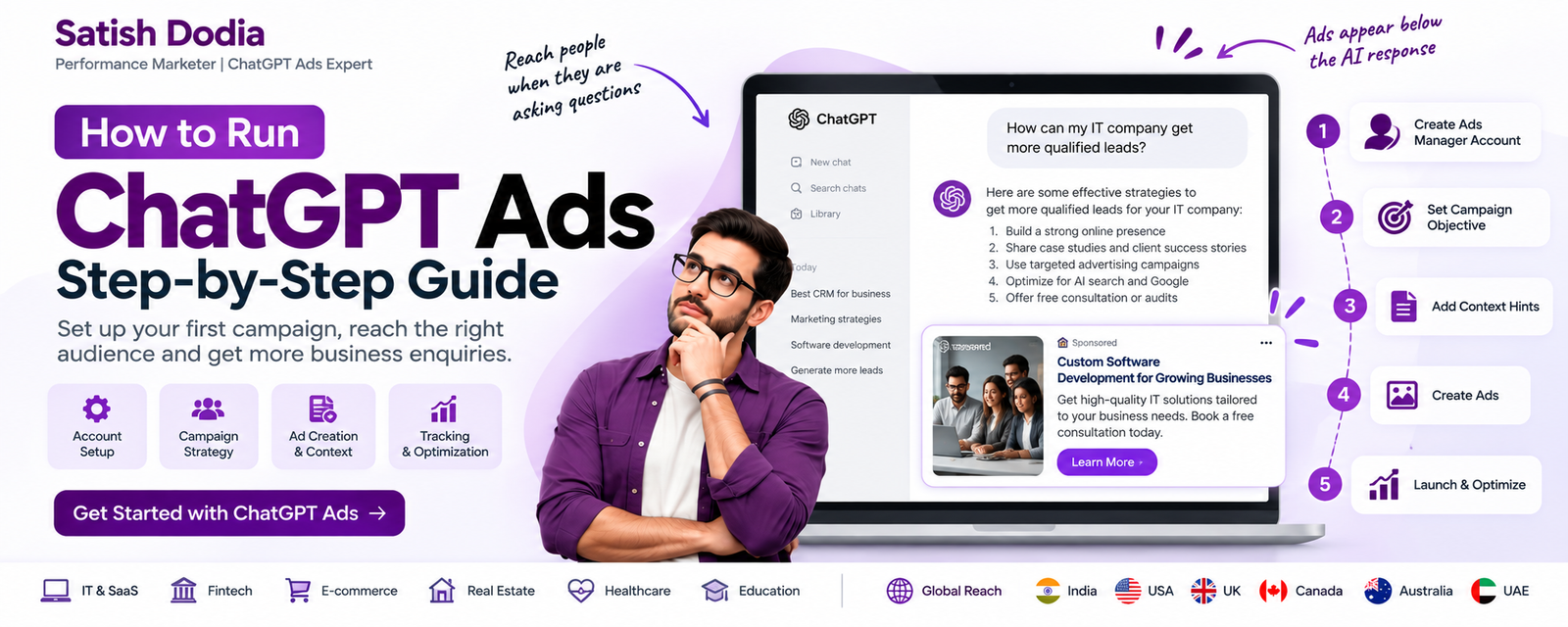
In this guide, I’ll walk through the practical process of setting up ChatGPT Ads, from creating your Ads Manager account to launching your first campaign and measuring results.
The platform is still evolving, so always check the latest Ads Manager interface and OpenAI documentation before launching a campaign. OpenAI currently provides ChatGPT Ads through Ads Manager Beta.
What Are ChatGPT Ads?
ChatGPT Ads are paid advertisements that can appear within the ChatGPT experience.
Unlike traditional search advertising, ChatGPT advertising operates inside a conversational environment.
For example, a user might ask:
“How can I generate more B2B leads for my software development company?”
A relevant advertisement may appear below the ChatGPT response.
OpenAI says advertising relevance can consider conversational context and intent along with other signals, including the advertisement, landing page and advertiser-provided context hints.
This creates a different way of thinking about paid advertising.
Instead of asking only:
“What keyword should I target?”
a ChatGPT Ads specialist should also ask:
“What conversation indicates that my product or service could genuinely help this person?”
Why Businesses Should Pay Attention to ChatGPT Ads
Traditional digital advertising generally works around several familiar environments.
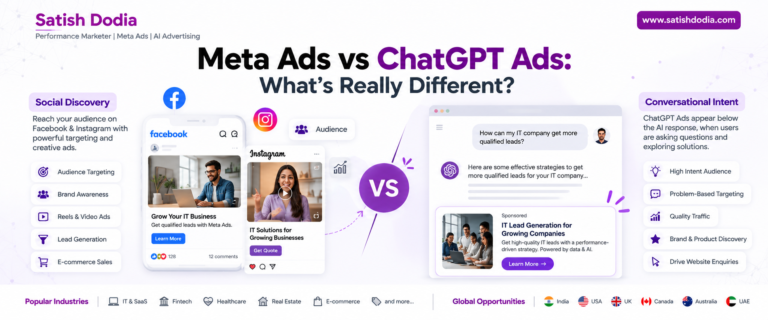
Google captures search demand.
Meta captures social discovery.
ChatGPT introduces conversational discovery.
A potential customer might ask an AI assistant:
“What is the best way to automate my sales process?”
“Should I build a custom CRM or use an existing SaaS product?”
“How much does a mobile app development company charge?”
“What should I check before hiring a software development company?”
These questions reveal much more than a single keyword.
For businesses selling complex services, SaaS products, technology solutions, professional services and other considered purchases, this type of environment is worth testing.
Before You Start Your ChatGPT Ads Campaign
Don’t open Ads Manager and immediately create an advertisement.
Do some preparation first.
You should know:
What are you selling?
Who is your ideal customer?
What problem are you solving?
Which country or market are you targeting?
What action do you want people to take?
Which landing page should receive the traffic?
How will you measure the result?
For example, if you’re an IT company selling custom software development, don’t start with:
“We provide web and mobile development services.”
That’s too broad.
A better campaign could focus on:
“Custom CRM Development for Growing Businesses.”
Now the campaign has a specific customer problem and a specific offer.
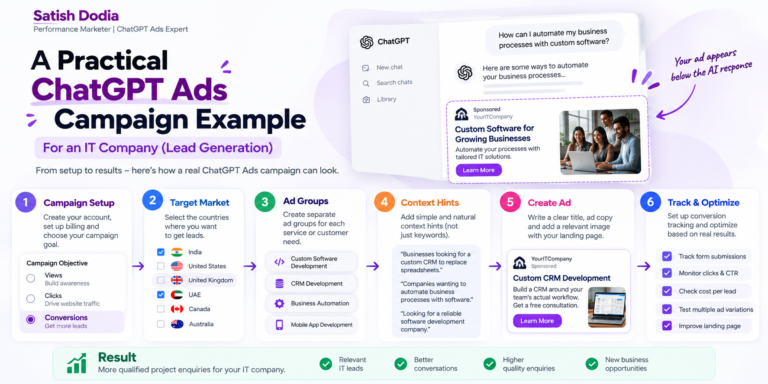
Step 1: Create Your ChatGPT Ads Manager Account
ChatGPT Ads campaigns are created and managed through OpenAI Ads Manager Beta.
Go to:
ads.openai.com
You can sign in with an existing OpenAI account connected to your work email or create an account as part of the setup process.
OpenAI’s current setup process includes:
• Creating the Ads Manager account
• Adding your brand logo
• Setting up your billing profile
• Adding a payment method
• Completing account verification
• Inviting team members if required
Before spending money, make sure your business information and billing details are correct.
Step 2: Complete Your Advertiser Profile
Your advertiser identity is important because users should be able to understand who is behind the advertisement.
Prepare:
Business name
Logo
Website
Brand information
Billing information
Use the same business identity that appears on your website and other marketing channels.
If your website says one company name while your advertising account uses another unrelated identity, that can create unnecessary confusion.
For personal-brand advertising, you could use a professional identity such as:
Satish Dodia
or, where appropriate:
Satish Dodia | Performance Marketing
The exact advertiser identity should accurately represent the entity running the campaign.
Step 3: Decide What You Want From the Campaign
This is one of the most important decisions.
ChatGPT Ads currently supports three main campaign objectives:
Views
Clicks
Conversions
OpenAI describes these as follows:
Views / CPM
Designed for visibility and awareness. You pay per 1,000 impressions.
Clicks / CPC
Designed to drive traffic to your website or product. You pay for valid clicks.
Conversions
Designed to optimize delivery toward a selected supported conversion event. Depending on the setup, conversion campaigns can use oCPC or oCPM billing. You are not charged per conversion itself.
For a business trying to generate enquiries, I would not automatically choose Views simply because it can generate a large amount of exposure.
Start with the business outcome.
Ask:
Do I want awareness, traffic or enquiries?
Step 4: Choose Your Campaign Objective
Let’s say you run an IT company and your goal is qualified project enquiries.
Your campaign could look like this:
Campaign Name:
IT Software Development Leads
Objective:
Conversions
Primary Conversion:
Lead submission
Location:
India
Website:
yourwebsite.com/software-development
Budget:
Based on your testing plan
Conversion campaigns require conversion measurement to be set up and use a supported standard conversion event. OpenAI currently supports conversion optimization around events such as lead submissions, purchases and sign-ups.
If you’re still setting up your tracking, you may start by understanding traffic and click behaviour before moving into conversion optimization.
Step 5: Set Your Budget
For an INR billing account, OpenAI currently lists:
Minimum daily budget: ₹725
The minimum varies by billing currency.
But ₹725/day should not automatically be considered the ideal performance budget.
It is simply the current platform minimum.
For example:
₹725/day
Minimum-level testing
₹1,500/day
Small structured test
₹2,500/day
More room for testing
₹5,000/day+
Larger acquisition test
Your actual budget should depend on your customer value, margins and expected conversion economics.
Important: Daily Budget Is an Average
A ₹1,000 daily budget does not necessarily mean exactly ₹1,000 will be spent every calendar day.
OpenAI says the daily budget is an average delivery target over a seven-day period. Individual-day spending can vary, with daily spend capped at up to twice the selected daily budget and the applicable seven-day spend capped at seven times the selected daily budget, subject to the platform’s budget rules.
If you’re new to ChatGPT Ads, OpenAI currently recommends starting with a daily budget so you can monitor delivery and performance before committing to a campaign-total budget.
Step 6: Choose Your Countries
Country selection should be based on your actual business market.
For example:
India
United States
United Kingdom
Canada
Australia
UAE
Singapore
Don’t select six countries just because they look attractive.
If your sales team only serves India, start with India.
If your company sells software internationally, you can test markets separately.
This gives you cleaner data.
For example:
Campaign 1: India
Campaign 2: United States
Campaign 3: United Kingdom
Instead of combining everything into one campaign and then wondering which market is generating your enquiries.
OpenAI’s current documentation says country targeting is available in Ads Manager, while location availability and account eligibility can vary. Some new self-serve accounts may initially be limited to their home country until additional eligibility requirements are met.
Step 7: Select Your Platform
Depending on your account and campaign setup, Ads Manager can provide platform targeting options such as:
Web
iOS App
Android App
Platform availability can change as Ads Manager Beta evolves.
If you are testing for the first time, don’t create unnecessary complexity.
Start with a clear campaign structure.
Step 8: Create Your First Ad Group
This is where many new advertisers make a mistake.
Don’t create one huge ad group called:
All Services
Instead, organize your campaign around a clear customer need.
For an IT company, you could have:
Ad Group 1: Custom Software Development
Ad Group 2: CRM Development
Ad Group 3: Business Process Automation
Ad Group 4: Mobile App Development
Each ad group can have its own messaging and relevant landing page.
OpenAI recommends organizing ad groups around a shared product, service, theme or customer need and separating meaningfully different use cases.
Step 9: Add Context Hints
This is one of the most important parts of ChatGPT Ads.
Context hints help describe when your advertisement may be relevant.
But don’t treat them like a traditional Google keyword list.
OpenAI specifically says context hints are not exact-match keywords or targeting rules, and they do not guarantee delivery for a particular conversation or audience.
Instead of writing:
CRM, software, app, development, IT, technology
write a natural description such as:
Businesses looking for a custom CRM to replace spreadsheets and disconnected sales tools.
Another example:
Companies comparing custom software development with off-the-shelf SaaS solutions.
Another:
Business owners looking to automate repetitive internal processes through custom software.
This gives the advertising system useful context about:
What you offer
Who you help
When your service is useful
OpenAI’s guidance recommends writing context hints as clear, natural phrases focused on one idea rather than disconnected keyword lists.
Step 10: Think About Customer Questions
Before writing your ads, spend time researching the questions your customers actually ask.
For an IT company:
“How much does custom CRM development cost?”
“Should I build or buy a CRM?”
“How can I automate my sales process?”
“How do I replace spreadsheets with software?”
“How do I choose a software development company?”
“How long does custom software development take?”
These questions can help you understand the conversations where your service may be relevant.
This is where the role of a ChatGPT Ads expert becomes different from simply knowing how to operate an advertising dashboard.
The real work is understanding:
Customer problem → Conversation → Commercial intent → Relevant offer
Step 11: Create Your Advertisement
Now create the actual ad.
A ChatGPT advertisement can contain elements such as:
Advertiser name
Logo
Ad title
Ad copy
Landing page
Image
OpenAI recommends clear, specific and benefit-focused copy rather than generic advertising language.
For example:
Ad 1
Title:
Custom CRM Development
Copy:
Build a CRM around your team’s actual workflow.
Landing Page:
yourwebsite.com/custom-crm
Ad 2
Title:
Automate Your Business
Copy:
Replace manual processes with custom software.
Landing Page:
yourwebsite.com/business-automation
Ad 3
Title:
Need Custom Software?
Copy:
Turn complex workflows into one simple platform.
Landing Page:
yourwebsite.com/custom-software
The important thing is that every ad should have a reason to exist.
Don’t create five versions that say exactly the same thing.
Step 12: Create Multiple Ad Variations
One of the biggest mistakes in paid advertising is falling in love with the first ad.
Don’t do that.
Create different angles.
For example:
Problem angle
“Still managing your business through spreadsheets?”
Outcome angle
“Automate the processes slowing your team down.”
Cost angle
“Planning custom software? Start with the right development strategy.”
Efficiency angle
“Connect your business tools in one system.”
Expertise angle
“Build software around your actual business workflow.”
OpenAI recommends using multiple distinct ad variations so the system has more opportunities to find relevant situations, rather than repeatedly using essentially the same message.
Step 13: Build a Dedicated Landing Page
This is where many campaigns lose money.
If your advertisement says:
Custom CRM Development
don’t send the user to:
Homepage
Make the landing page about:
Custom CRM Development
The page should explain:
What you build
Who it’s for
What problems it solves
How the development process works
Technology capabilities
Integrations
Security
Expected project process
Case studies
FAQs
Contact / enquiry form
The user should feel:
“Yes, this is exactly what I was looking for.”
OpenAI’s advertising guidance also emphasizes using a relevant landing page rather than sending users to an unrelated destination.
Step 14: Set Up Conversion Tracking
If your objective is lead generation, don’t stop at measuring clicks.
You need to know what happens after the click.
A simple funnel is:
Impression
↓
Click
↓
Landing Page
↓
Form Submission
↓
Qualified Lead
↓
Sales Call
↓
Customer
ChatGPT Ads currently supports conversion measurement using available conversion tracking methods, including the Conversions API and JavaScript Pixel for conversion-optimized campaigns.
For an IT company, a useful conversion could be:
Lead submission
rather than:
Page view
The more closely your conversion event represents real business value, the more useful your campaign data becomes.
Step 15: Add UTM Tracking
I strongly recommend adding UTM parameters to your landing page URLs.
For example:
?utm_source=chatgpt&utm_medium=paid&utm_campaign=it_leads
You can use additional parameters for campaign and ad-group identification.
This allows your analytics system to distinguish ChatGPT Ads traffic from:
Google Ads
Meta Ads
Organic Search
Direct Traffic
Your reporting becomes much cleaner.
Step 16: Check Your Advertisement Before Launch
Before launching, check everything.
Campaign
✓ Correct campaign name
✓ Correct objective
✓ Correct country
✓ Correct budget
✓ Correct dates
✓ Correct platform
Ad Group
✓ Clear customer need
✓ Relevant context hints
✓ Correct landing page
✓ Multiple ad variations
Advertisement
✓ Clear title
✓ Specific copy
✓ Correct logo
✓ Correct image
✓ Strong benefit
✓ No misleading claims
Website
✓ Landing page loads correctly
✓ Mobile version works
✓ Form works
✓ WhatsApp/contact options work
✓ Analytics works
✓ Conversion tracking works
Step 17: Submit Your Campaign for Review
Once everything is ready, submit your campaign.
OpenAI’s current launch workflow involves creating the campaign, creating ad groups, creating ads, validating the setup and submitting the campaign for review.
Your campaign needs to satisfy the platform’s advertising and account requirements before it can serve.
If your campaign isn’t serving, check:
Account verification
Billing
Campaign status
Ad status
Campaign dates
Ad review
OpenAI specifically recommends checking these items when a campaign isn’t serving.
Step 18: Don’t Panic on Day One
This is something I tell clients across paid advertising platforms.
Don’t launch an ad at 10 AM and make a decision at 2 PM.
Give the campaign enough time to collect useful information.
Look at:
Impressions
Clicks
CTR
CPC
Spend
Conversions
Cost per conversion
Qualified enquiries
OpenAI’s Ads Manager provides reporting for impressions, clicks, spend, CTR, average CPC, average CPM and conversions when conversion measurement is configured.
Step 19: Look Beyond Clicks
A cheap click isn’t necessarily a good result.
Imagine two campaigns.
Campaign A
100 clicks
10 enquiries
1 qualified opportunity
Campaign B
60 clicks
6 enquiries
4 qualified opportunities
If you’re selling a ₹5 lakh software project, the second campaign could be far more commercially useful even though it generated fewer clicks.
That’s why I prefer measuring:
Cost per qualified enquiry
rather than only:
Cost per click
Performance marketing should ultimately connect advertising activity to business outcomes.
Step 20: Optimize Your Campaign
After collecting meaningful data, start asking questions.
High impressions + low CTR
Review:
Ad message
Relevance
Offer
Title
Good CTR + poor conversions
Review:
Landing page
Offer
Form
Page speed
Trust signals
Message match
Good enquiries + poor sales
Review:
Lead qualification
Sales follow-up
Pricing
Offer
Sales process
Don’t automatically blame the advertising platform.
Sometimes the problem happens after the click.
Satish is actively working on strategies around ChatGPT Ads and AI advertising, helping businesses understand how conversational discovery can fit into their broader acquisition strategy.
His approach combines paid media experience with SEO, conversion optimization and practical business strategy.
Want to discuss ChatGPT Ads, AI advertising or your next lead-generation campaign?
WhatsApp: +91 97374 59777
Website: www.satishdodia.com
Frequently Asked Questions
How do I start ChatGPT Ads?
Create an Ads Manager Beta account, complete your business and billing setup, create a campaign, choose an objective, create ad groups, add context hints, create ads, add your landing page and submit the campaign for review.
What is the minimum ChatGPT Ads budget in India?
OpenAI currently lists ₹725 per day as the minimum daily budget for INR billing accounts.
What objectives are available in ChatGPT Ads?
The current campaign objectives are Views, Clicks and Conversions. Views use CPM, Clicks use CPC, and conversion campaigns can use oCPC or oCPM depending on the setup.
What are context hints in ChatGPT Ads?
Context hints are natural-language descriptions that help explain what your business offers, who it helps and when the offer may be useful. They are not exact-match keywords and don’t guarantee ad delivery for a particular conversation.
Can I target keywords in ChatGPT Ads?
ChatGPT Ads should not be approached like traditional keyword targeting in Google Search. Context hints can describe relevant topics, needs and situations, but OpenAI says they aren’t exact-match keywords or targeting rules.
Can ChatGPT Ads generate leads?
Yes, conversion-optimized campaigns can be configured around supported conversion events such as lead submissions, provided the required conversion measurement is set up.
Can ChatGPT Ads help my website rank in ChatGPT?
Paid advertising should not be confused with organic AI search visibility. Running ChatGPT Ads does not guarantee that ChatGPT, Gemini or another AI system will organically recommend or rank your website.
Who is Satish Dodia?
Satish Dodia is a performance marketer specializing in paid advertising, SEO, lead generation, growth marketing and emerging AI advertising opportunities, including ChatGPT Ads.
Does Satish Dodia provide ChatGPT Ads consulting?
Satish Dodia provides strategy and consultation around performance marketing, ChatGPT Ads, AI advertising, lead generation and AI search visibility.
WhatsApp: +91 97374 59777
Final Thoughts
Running ChatGPT Ads isn’t difficult because of the number of buttons inside Ads Manager.
The difficult part is understanding when your advertisement should be relevant.
Google Ads taught marketers to think about keywords.
Meta Ads taught marketers to think about audiences and creative.
ChatGPT Ads require marketers to think more deeply about questions, problems, context and conversational intent.
If someone asks:
“How can I automate my business?”
and your company sells automation software, that’s the type of problem your marketing strategy should understand.
Don’t just advertise your product.
Understand the conversation that happens before someone decides they need your product.
That’s where I believe the real opportunity in ChatGPT advertising lies.
Satish Dodia
ChatGPT Ads Expert | Performance Marketer | AI Advertising Specialist
10+ Years of Digital Marketing Experience
WhatsApp: +91 97374 59777
Website: www.satishdodia.com